Inter Company Transactions
Intercompany transactions refer to financial activities that occur
between two or more entities within the same parent company or a group
of affiliated companies. These transactions can involve the exchange of
goods, services, or finances among the different entities under the
same corporate umbrella.Common types of intercompany transactions include:
- Transfer of Goods or Services
:When one entity within the company transfers inventory, products, or
services to another entity within the same company structure.
- Financial Transactions :
This involves financial dealings such as loans, cash transfers, or
payments made between the various entities under the same parent
company.
- Sharing Resources or Assets
: Entities might share resources like equipment, facilities, or
intellectual property, leading to transactions within the company
structure.
- Cost Allocations : Allocating costs for shared services or expenses across different entities is also a form of intercompany transaction.
- Intercompany Reconciliations
: Reconciling accounts and ensuring that transactions between related
entities are properly documented and accounted for in the financial
statements.
Inter company Register Page
Accessed from the 'Transaction' menu under the 'General' section, the Intercompany Transactions module hosts the register page for all intercompany transactions within this Business Unit, encompassing transactions both originating from and received from other business units. Transactions are categorized into 'Local' and 'Foreign' transactions; 'Local' transactions occur within the logged-in business unit, while 'Foreign' transactions are those booked under different entities.
The Intercompany Transaction listing grid showcases various transactional details. 'Tran Type' signifies whether the transaction is 'Local' or 'Foreign.' The subsequent four fields—'Local Transaction Date,' 'Doc Code,' 'Transaction Value,' and 'Description'—pertain to the local transactions, which could be either Journals or Payments.
Following these, the grid includes four fields related to the foreign transactions: 'Foreign Transaction Date,' 'Doc Code,' 'Description,' and 'Status of the Document' (indicating whether it's posted or in draft mode).
The 'Action' column empowers the accounts executive to take action on intercompany transactions originating from foreign entities. By clicking the 'Process' button, the executive can create the document locally to finalize the intercompany transaction entries. Additionally, users can navigate and inspect local documents by clicking on the respective local document code.
To streamline the search for relevant results, the grid provides filters such as 'Business Entity,' 'Local or External,' and 'Date Range,' ensuring efficient retrieval of pertinent information.

This module facilitates two primary types of Intercompany transactions: Journal Entries and Payments. However, before these transactions can be processed, the ERP application requires initial configuration to identify the respective Business entities and their associated Ledger accounts within the chart of accounts. These configuration details are outlined separately under a different title.
Journal Entry
When a journal entry is booked using a ledger configured under Intercompany settings, the application automatically recognizes it as an intercompany entry. Based on this configuration, the system initiates the creation of a corresponding reverse journal entry for the relevant business entity.
For instance, if an intercompany ledger is credited with a certain value, the system generates an automatic entry in the first business entity's account, debiting the same value.
This automatic mechanism ensures that intercompany transactions are appropriately mirrored across the involved business entities, maintaining balance and accuracy in accounting records.
Payment Entry
In the scenario of a Payment entry recorded within the local business unit, a corresponding Receipt entry will be recorded within the concerned business unit against this local entity.
This process ensures that transactions initiated within one business unit reflect accurately in the respective accounts of the involved entities, maintaining consistency and synchronization in financial records.
In both scenarios, the posting of the foreign entry requires manual interaction. The concerned executive is responsible for processing the document to keep it live. Subsequently, the finance executive receives notification and can proceed with processing the transaction after verifying the relevant documents.
Additionally, if a foreign entity entry is posted, simultaneous intimation is relayed to the local company transaction, ensuring synchronized communication and awareness across both entities involved in the intercompany transaction.
Upon successful posting of both transactions, the process of intercompany transactions concludes. The synchronized posting of entries in both the local and foreign entities signifies the completion of the intercompany transaction, ensuring accurate and balanced accounting records across the involved business units.
Inter company Entity and ledger Settings
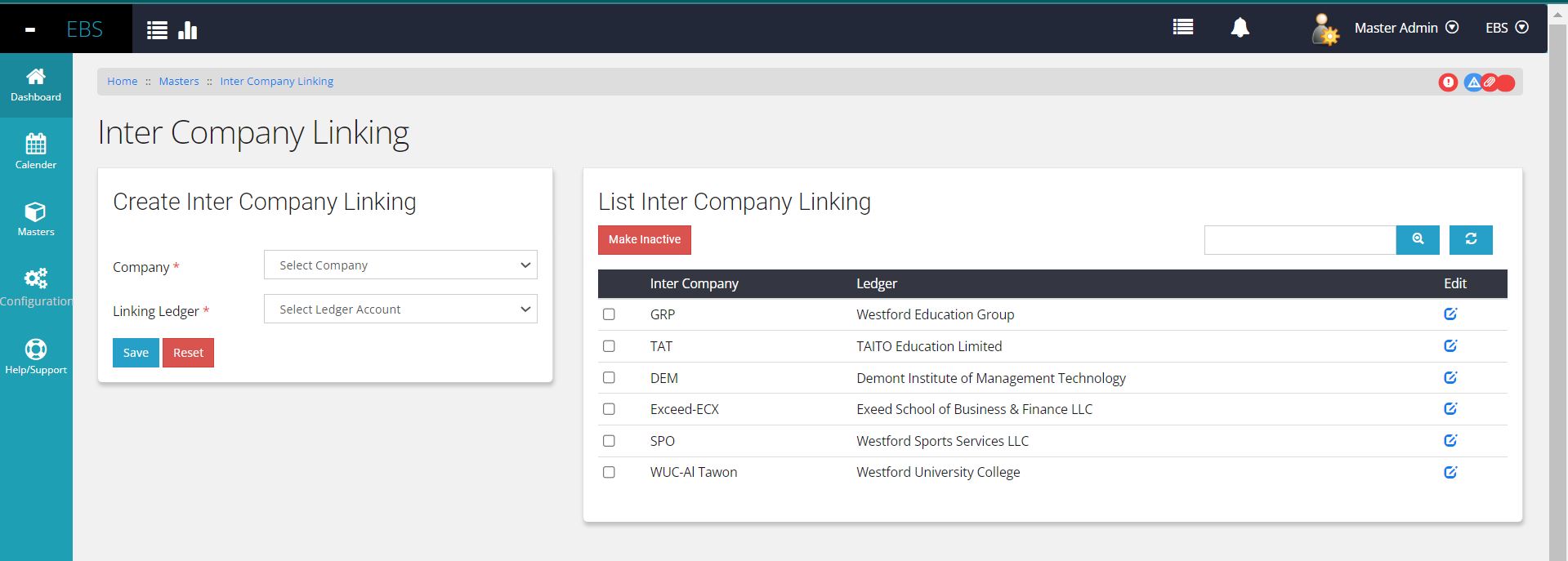
Within the 'Masters' section, under 'Finance Master,' the 'Intercompany Settings' link directs users to the dedicated settings page. Here, users can establish connections by linking Intercompany Entity ledgers to specific business entities.
To facilitate this linking process, businesses must be identified and registered beforehand within each respective business unit. Once identified, the linkage of Intercompany Entity ledgers to these business entities can be efficiently managed from this settings page.