User Guide: Bank Statement List Screen
Overview
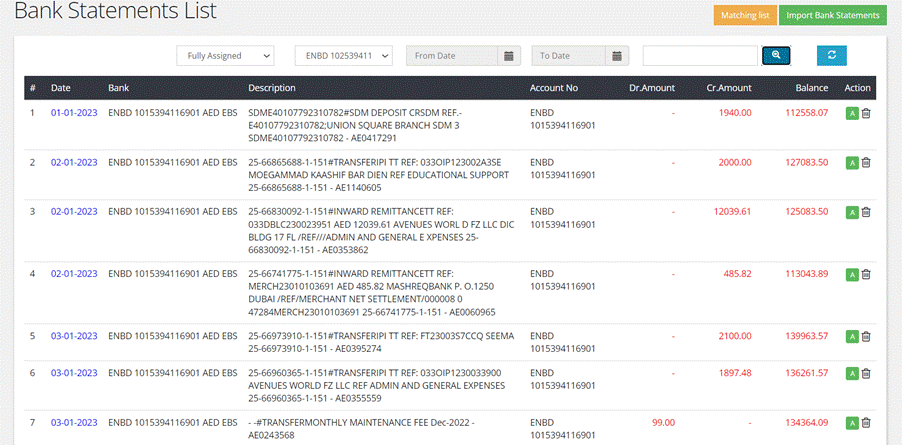
A bank statement
refers to a financial document or record that summarizes the
transactions and
activities related to a specific bank account over a defined period.
This
statement typically includes details such as deposits, withdrawals,
transfers,
checks issued or received, and the resulting account balance. User can
assess
from top left menu.
- Fields
The
main screen displays bank statement data
in a table format. Each row represents a single transaction, and there
are
several columns to display relevant information.
- Date: Date of the
transaction.
- Bank Name: The name of the
bank associated with the transaction.
- Description: A description or
note related to the transaction.
- Account Number: The account
number associated with the transaction.
- Debit: The amount
debited from the account for the transaction.
- Credit: The amount
credited to the account for the transaction.
- Balance: The account
balance after the transaction.
- Actions: This column
likely contains options for users to perform actions on individual
transactions, such as deleting them. This column also indicates the
status of assignment for each transaction, such as "Not Assigned,"
"Partially Assigned," or "Fully Assigned."
- Filters
Users can filter the
displayed data based on various criteria:
- Assigned Status: Users can filter
transactions by their assignment status, which includes "Not
Assigned," "Partially Assigned," and "Fully Assigned."
- Account Type: Users can filter
transactions by specifying the account type (e.g., deposit account).
- Date Range: Users can set a
specific date range to view transactions within a specified time
frame.
3.Import Bank
Statement:
Users can import an
entire bank statement as an Excel sheet. This feature is accessible by
clicking
on an "Import Bank Statement" button located in the top-right corner
of the screen. This allows users to easily add new transactions to
their records.